

Project Overview
GICMED is a comprehensive medical case management and diagnostic support application designed for hospitals and clinical environments. The platform enables seamless collaboration between nurses, doctors, hospital administrators, and super administrators through a secure, role-based workflow.
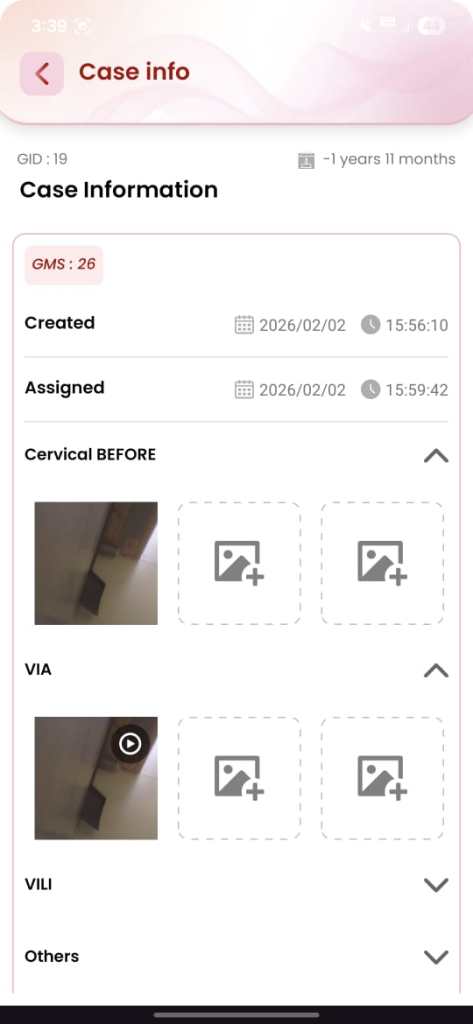
The system allows nurses to register patients, create medical cases, and capture clinical images and videos using an integrated UVC (USB Video Class) endoscopy camera directly within the Android application. Once a case is completed, it can be assigned to doctors for review and diagnosis, with results reflected instantly across the system.
By combining native Android development, real-time communication, local + cloud data storage, and hardware integration, GICMED digitizes and streamlines the entire patient case lifecycle.
View app on

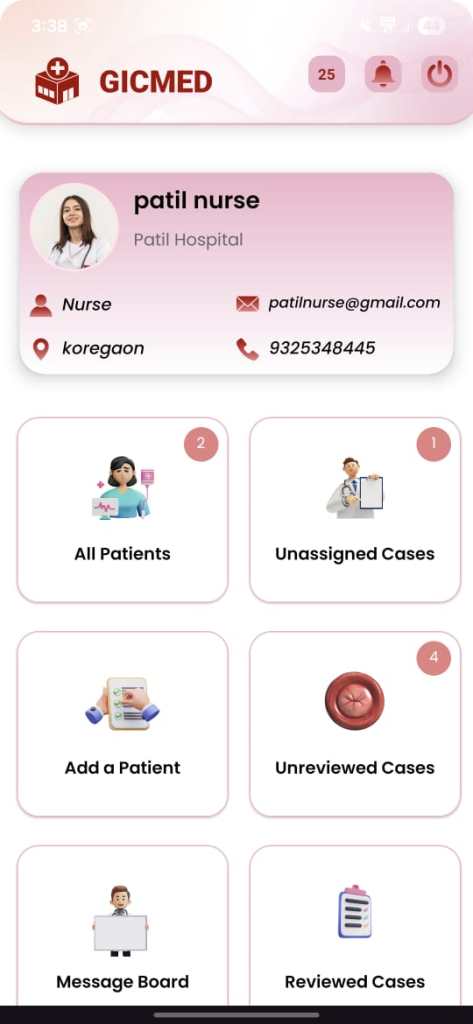
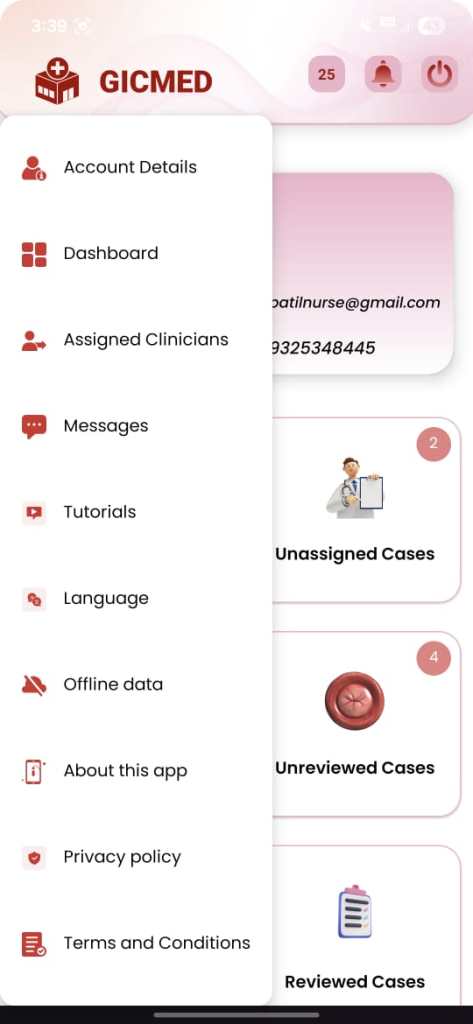
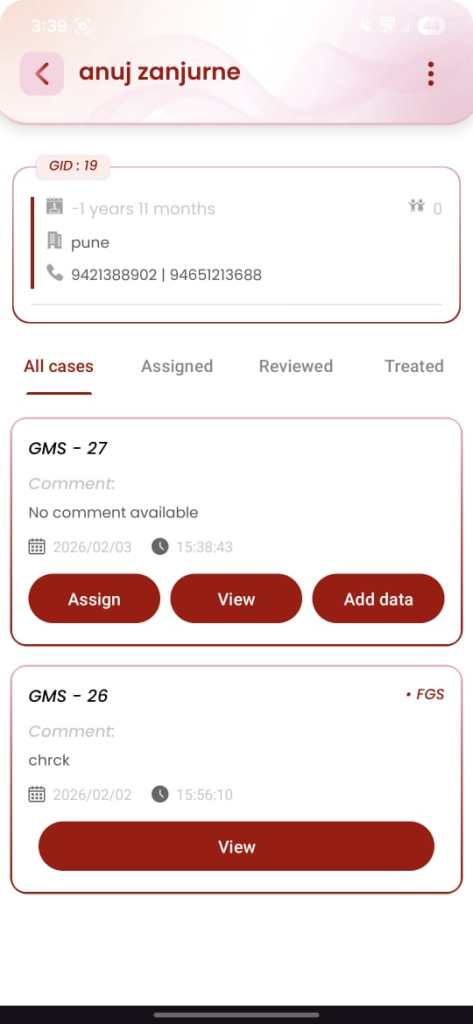
App Interface
Key Features
- Role-Based Access Control
- Super Admin, Hospital Admin, Nurse, Doctor
- Each role has clearly defined permissions and data visibility
- Secure login system with role-based routing
- Patient & Case Management
- Nurses can:
- Register patients
- Create multiple cases per patient
- Edit patient and case details
- Auto-generated unique IDs:
- Patient ID (GID-x)
- Case ID (GMS-x)
- Nurses can:
- Medical Image & Video Capture
- Direct integration of UVC endoscopy camera
- Capture high-quality images and videos within the Android app
- Media stored securely and linked to the correct case
- Optimized handling for medical imaging workflows
- Doctor Case Review Workflow
- Doctors receive cases only from assigned hospitals
- Dashboard divided into:
- Not Reviewed cases
- Reviewed cases
- Diagnosis workflow includes:
- Result selection (Positive / Negative / Inconclusive)
- Detailed textual comments
- Instant update of diagnosis visible to nurses and hospital staff
- Hospital & Credit Management
- Super Admin can:
- Create hospitals with auto-generated codes (H1, H2, …)
- Assign case credits (1 credit = 1 case)
- Hospital Admins can monitor all activity within their hospital
- Super Admin can:
- Real-Time Communication
- In-app messaging between:
- Nurses
- Doctors
- Admins
- Real-time notifications for:
- Case assignment
- Case review completion
- Messages
- In-app messaging between:
- Offline & Online Data Handling
- Local database for offline usage and reliability
- Firebase backend for : Real-time synchronization , Secure cloud storage , Instant data updates across users
Challenges
- OCR Accuracy
Challenge: Integrating a UVC (USB Video Class) endoscopy camera with a native Android application was one of the most critical challenges. Android does not provide full native support for external UVC medical cameras, which led to issues with device recognition, connection stability, and stream handling during image and video capture.
Solution: To overcome this, a dedicated UVC camera library was integrated into the application. Custom handling was implemented to manage USB permissions, device lifecycle, and camera initialization. Additional optimizations were applied to ensure stable streaming, reliable capture, and smooth interaction between the hardware and the Android app. - Medical Image and Video Quality Optimization
Challenge: Medical diagnosis depends heavily on image and video clarity. Captured endoscopy images and videos initially faced issues such as compression artifacts, frame drops, and inconsistent quality across devices.
Solution: Specialized media handling techniques were implemented to optimize resolution, frame rate, and compression settings. The camera library was fine-tuned to balance high-quality output with performance efficiency, ensuring that all captured images and videos met clinical review standards while maintaining smooth app performance. - Role-Based Dashboard Management
Challenge: Each user role (Super Admin, Hospital Admin, Nurse, Doctor) required access to different datasets, features, and dashboards. Maintaining strict access control while keeping the UI intuitive was a significant challenge.
Solution: A role-based access control (RBAC) system was implemented. Dashboards, actions, and data visibility were dynamically rendered based on user roles. This ensured that users only accessed authorized data while maintaining a clean and focused interface tailored to their responsibilities. - Role-Based Dashboard Management
Challenge: Each user role (Super Admin, Hospital Admin, Nurse, Doctor) required access to different datasets, features, and dashboards. Maintaining strict access control while keeping the UI intuitive was a significant challenge.
Solution: A role-based access control (RBAC) system was implemented. Dashboards, actions, and data visibility were dynamically rendered based on user roles. This ensured that users only accessed authorized data while maintaining a clean and focused interface tailored to their responsibilities. - Offline Support with Local Database
Challenge: Hospitals and clinical environments may experience unstable internet connectivity, which could disrupt workflows during patient registration, case creation, or media capture.
Solution: A local database was implemented to store patient, case, and media metadata offline. Once connectivity was restored, data automatically synchronized with Firebase, ensuring no loss of critical medical information and uninterrupted clinical operations. - Secure Multi-Role Communication
Challenge: Enabling secure and instant communication between nurses, doctors, and administrators while maintaining data privacy and role boundaries was essential.
Solution: A real-time messaging and notification system was developed with role-based filtering. Users could communicate efficiently while ensuring that messages and alerts were delivered only to authorized recipients.
Development Process
Research & Development (R&D) – UVC Camera Feasibility
- Evaluate the feasibility of integrating a UVC (USB Video Class) endoscopy camera with a mobile application due to the lack of strong, consistent platform support.
- Activities:
- Conducted in-depth R&D on UVC camera communication across multiple platforms, including Android and Flutter
- Analyzed limitations of default camera APIs for external USB medical devices
- Tested available third-party UVC libraries for:
- Device detection
- USB permission handling
- Stable video streaming
- Image and video capture quality
- Compared platform capabilities to finalize Android native development as the most reliable solution for medical-grade camera integration
- Selected a stable UVC camera library and finalized a native Android approach to ensure reliable hardware communication and high-quality medical imaging.
Android Application Development
- Built modular Activities and Fragments for maintainable code structure
- Integrated selected UVC camera drivers for endoscopy image and video capture
- Implemented a local database to support offline workflows
- Developed real-time messaging and notification features
- Optimized media handling for performance and stability
Firebase Integration
- Implemented secure authentication for all user roles
- Enabled real-time updates for:
- Case assignment
- Case review and diagnosis submission
- Integrated cloud storage for medical images and videos
- Optimized upload and retrieval for large media files
Testing & Quality Assurance
- Tested UVC camera connectivity and capture across supported Android devices
- Verified role-based access control and data visibility
- Ensured real-time synchronization accuracy between users
- Validated offline-to-online data consistency and recovery scenarios
Testing and Optimization
Performance Testing
- Optimized media capture and storage
- Reduced latency in real-time updates
- Ensured smooth UI performance under heavy data loads
Usability Testing
- Simplified workflows for nurses and doctors
- Reduced steps for case creation and diagnosis
- Improved clarity of dashboards and status indicators
Post-Launch Maintenance
Ongoing Updates
- Continuously monitored application performance, crash reports, and system logs to ensure platform stability
- Delivered regular bug fixes and feature enhancements based on real hospital user feedback
- Improved UVC camera connection stability and reduced disconnection issues through iterative updates
- Enhanced medical image and video capture quality through tuning and library-level optimizations
- Refined role-based dashboards to improve clarity of case status indicators (Unassigned, Unreviewed, Reviewed)
- Maintained compatibility with the latest Android OS versions and Google Play Store requirements
Performance Monitoring
- Monitored Firebase real-time data synchronization to ensure reliable patient, case, and diagnosis updates
- Tracked case lifecycle flows to identify and resolve workflow bottlenecks
- Optimized performance for large medical image and video uploads
- Improved responsiveness of dashboards under high case volumes
- Enhanced backend scalability without impacting real-time user experience
Outcome
- Improved Clinical Workflow Efficiency: GICMED significantly streamlined hospital workflows by digitizing patient registration, case creation, medical imaging, and diagnosis review, reducing manual effort and turnaround time for case handling.
- Faster Diagnosis & Decision Making: Real-time case assignment and instant diagnosis updates enabled doctors to review cases promptly, improving response time and accelerating clinical decision-making.
- Reliable Medical Imaging & Documentation: The integration of UVC endoscopy cameras with optimized image and video capture ensured high-quality medical documentation, supporting accurate diagnosis and consistent case records.
- Clear Case Tracking & Status Visibility: Well-defined case statuses (Unassigned, Unreviewed, Reviewed) provided clear visibility across dashboards, improving coordination between nurses, doctors, and hospital administrators.
- Enhanced Collaboration Across Roles: Role-based dashboards combined with real-time messaging and notifications improved communication between medical staff, reducing dependency on manual follow-ups.
- Scalable & Future-Ready Medical Platform: The cloud-backed architecture with local offline support enabled GICMED to scale across multiple hospitals while maintaining data reliability, security, and performance.
Client Testimonial
“GICMED has transformed the way we manage patient cases and medical imaging across our hospitals. The ability for nurses to capture endoscopy images directly within the app and assign cases to doctors in real time has significantly reduced delays in diagnosis.
The role-based dashboards give our staff clear visibility into case status, while the real-time updates and messaging have improved collaboration between nurses, doctors, and administrators. The system is reliable, easy to use, and well-suited for a busy clinical environment. GICMED has become an essential part of our daily medical workflow.”